
Move a Rails app from Resend to 1billion
#rails#ruby#resend#dns
Your Rails app sends its mail with Resend, and you want to try 1billion. You do not need a big switch day. Both services can run side by side, and you move one mailer at a time, starting with the one that matters most: the login code.
This post shows each step. The mailers and the views of your app do not change.
Where you start
With Resend, a Rails app has the resend gem, a key in an initializer, and one line of config:
# Gemfile
gem "resend"

# config/initializers/mailer.rb
Resend.api_key = ENV["RESEND_API_KEY"]

# config/environments/production.rb
config.action_mailer.delivery_method = :resend
1. Add the 1billion gem
bundle add 1billionKeep the resend gem for now: the two delivery methods live together. Then give the app its key, as you did with RESEND_API_KEY:
ONEBILLION_API_KEY=ob_...The gem reads ONEBILLION_API_KEY by itself, so there is no initializer to write. If you keep your keys in the Rails credentials, one line sets it:
# config/initializers/onebillion.rb
OneBillion.api_key =
  Rails.application.credentials.dig(:onebillion, :api_key)
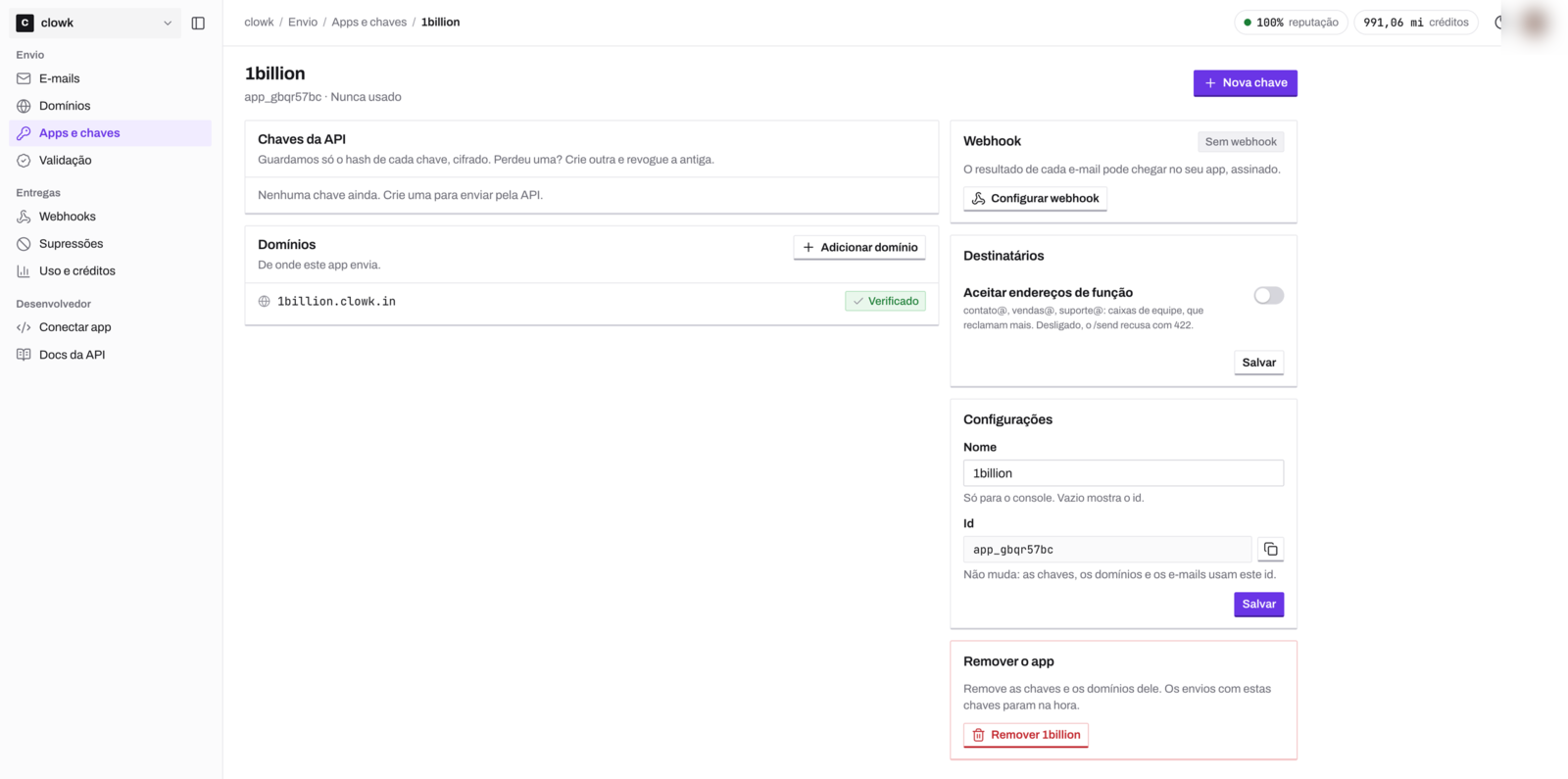
Make the API key in the console, on the page of your app. We keep only a hash of each key: if you lose one, make a new key and revoke the old one.
2. Verify the domain, with Resend still on
Add your domain to the app in the console. Two records are required: a TXT at 1billion._domainkey.<domain> with the DKIM key, and a CNAME for the return path, which holds the SPF and the MX. The return path is 1billion.<domain> by default, and the console shows the exact name and value to copy. A DMARC policy is recommended; if your domain already has one, keep it.
On Cloudflare, keep the records as DNS only (the grey cloud).
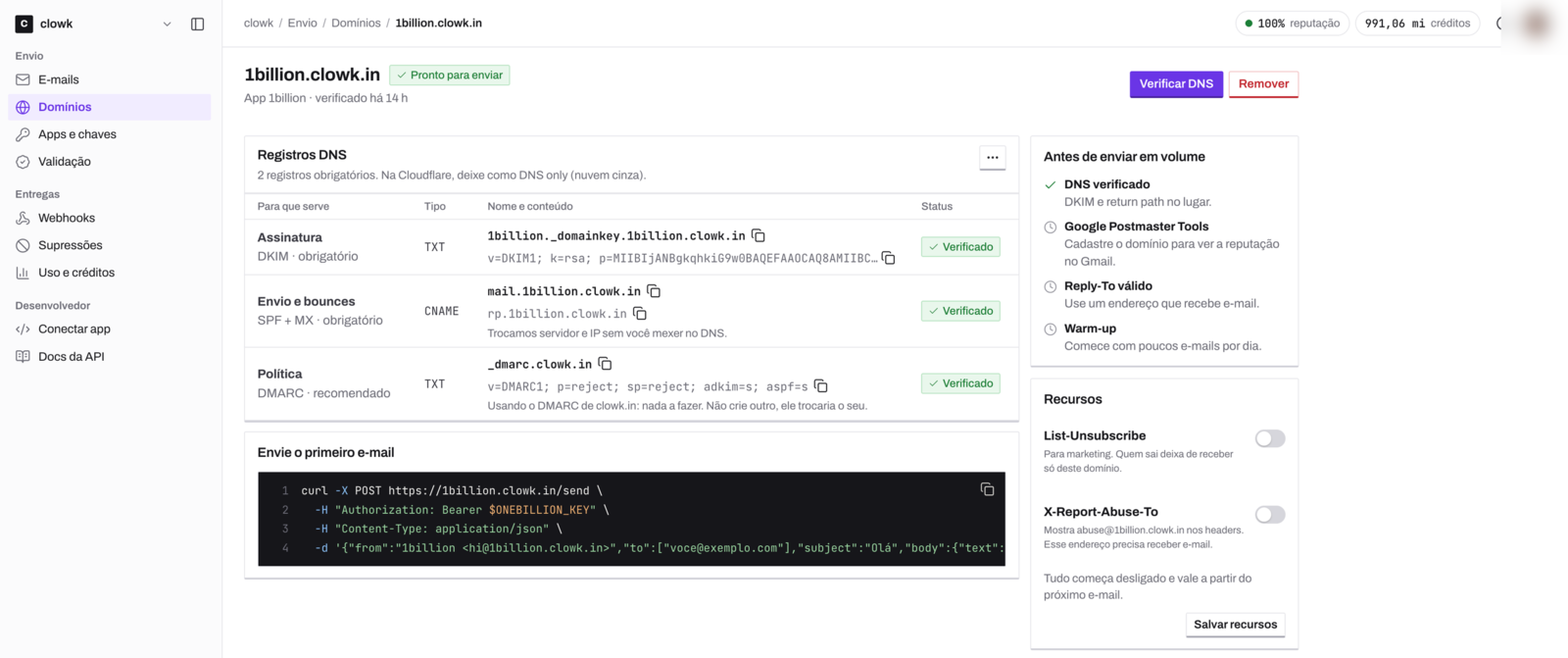
These names are not the names that Resend uses, so the records of the two services stay in your DNS together. Resend goes on sending while the console checks the new records. See Domains and DNS.
3. Move one mailer
A mailer can pick its own delivery method. Start with the mail that a person waits for:
class LoginMailer < ApplicationMailer
  self.delivery_method = :onebillion

  def code(user, code)
    @code = code

    mail(to: user.email, subject: "Your code")
  end
end
Every other mailer still goes through Resend. Watch the login mail in the console for a day: each recipient has its message, with the status and the last answer of the remote server.
4. Keep a retried job from sending twice
The gem sends the finished MIME message, and uses its Message-ID as the Idempotency-Key: the same key in 30 days returns the first answer and sends nothing again.
deliver_later renders the mail again in the job. If the job runs twice, the second run has a new Message-ID, so it is a new mail. For the mail that must never go out twice, set a Message-ID that names the mail:
mail(
  to: user.email,
  subject: "Your code",
  message_id: "<login-#{user.id}-#{code}@acme.com>"
)
5. Decide what a failed delivery does
The gem already tries again on a 503 or a network error, 3 times, with the same key. Other errors reach the delivery job, and you choose what each one does:
# config/initializers/onebillion.rb
Rails.application.config.after_initialize do
  job = ActionMailer::MailDeliveryJob

  # Down for longer than the gem waits: try again later.
  job.retry_on OneBillion::Error,
    wait: :polynomially_longer, attempts: 10

  # No credits today: they come back at midnight.
  job.retry_on OneBillion::NoCredits, wait: 1.hour, attempts: 24

  # A bad message or recipient: a retry gives the same answer.
  job.discard_on OneBillion::Refused
end
NoCredits and Refused are kinds of OneBillion::Error. Active Job looks at the handler declared last first, so declare the general one first, as here.
6. Move the calls to the API
Code that calls the Resend API directly changes one name. The fields are the same:
# Before
Resend::Emails.send({
  from: "Acme <hi@acme.com>",
  to: ["jane@example.com"],
  subject: "Your receipt",
  html: "<p>Thanks for your order.</p>"
})

# After
OneBillion::Emails.send({
  from: "Acme <hi@acme.com>",
  to: ["jane@example.com"],
  subject: "Your receipt",
  html: "<p>Thanks for your order.</p>"
})
It returns the id of the mail, as Resend does. A field that 1billion does not have yet raises an error that names it, so nothing is dropped without you knowing. To make a retry safe, pass a key: OneBillion::Emails.send(params, idempotency_key: "receipt-#{order.id}").
7. Move the webhooks
Resend signs its webhooks with Svix headers. 1billion signs them with 1B-Timestamp and 1B-Signature, and the gem checks both in one call: the signature, and that the event is less than 5 minutes old.
class OneBillionWebhooksController < ActionController::API
  def create
    event = OneBillion::Signature.verify(
      payload: request.raw_post,
      headers: request.headers
    )

    # event["type"]: delivered, bounced or unsubscribed.
    # Use event["id"] to ignore a repeated event.
    head :no_content
  rescue OneBillion::Signature::Invalid
    head :unauthorized
  end
end
The secret comes from ONEBILLION_WEBHOOK_SECRET; copy it from the page of the app. Run both endpoints while the two services send. See Webhooks.
8. Switch the rest, then remove Resend
When the login mail looks good, move the default and take self.delivery_method off the mailers:
# config/environments/production.rb
config.action_mailer.delivery_method = :onebillion
Then remove the resend gem, its initializer and its key, and take its DNS records off when you are sure.
What it costs
The first 100 mails of each day are free, every day: each workspace gets 100,000 credits at midnight, and a mail to one recipient costs 1,000. Read Free forever, forever! for why we can do that.
Re: Move a Rails app from Resend to 1billion
The first 100 mails of each day are free, every day. No card. Log in and send your first mail in a few minutes.
Start sending free